top of page
Promoting Data Transparency and Digital Literacy for Youth on Roblox
App Redesign

Overview:
This project focuses on improving data transparency within Roblox to help younger users understand and manage their data. The goal was to create a simplified, educational, and accessible data transparency feature that empowers users and builds digital literacy.
Tools Used:
Figma
Adobe Illustrator
Protopie
Role:
UX Designer

Rationale:
Roblox collects a significant amount of user data, yet many of its younger users aren’t aware of what information is being gathered or how to manage it. Currently, Roblox’s privacy policy is long, difficult to understand, and buried within the settings menu. My goal was to make this information more transparent by designing a kid friendly experience that helps users learn about data in a simple, engaging way while giving them clear tools to control their privacy.
How to currently view Roblox's privacy policy:
Research & Insights:
Through demographic and user research, I found that Roblox’s player base is primarily under 18 and heavily mobile based (80%). This informed my decision to focus on a simple, mobile design that uses icons, minimal text, and an optional parent friendly layer for more detailed data.

Roblox Colours & Type
Sources: Notta.ai (2024); Backlinko (2024)

Style Guide

Ideation & Wireframes:
My Initial sketches explored how a tutorial could teach users about data collection in an engaging way. My mid fidelity wireframes focused on flow and placement of new “Data Settings” and “Data Information” sections
Initial Sketches

Mid Fidelity Wireframes

High Fidelity Wireframes

User Flows:

Old user flow for finding data information:
New and improved user flow for finding data information:

User Testing & Feedback:
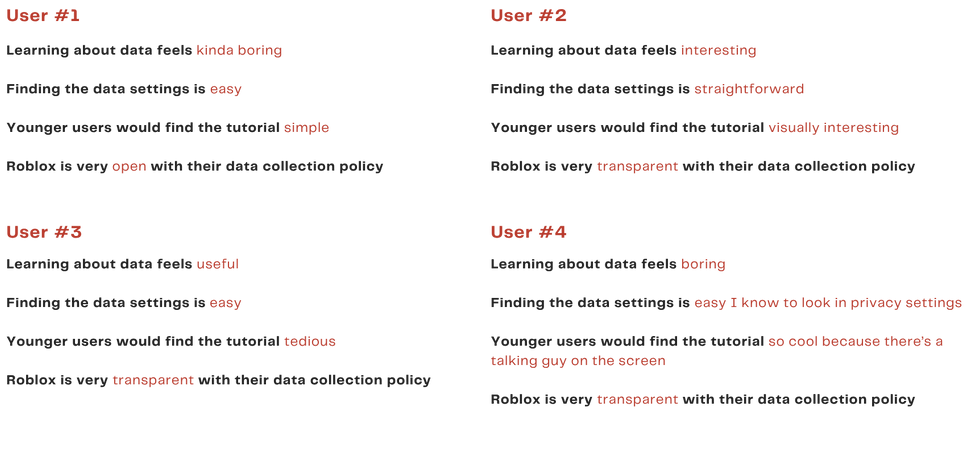
User testing helped me refine the tutorial to be more engaging and age appropriate. Feedback from peers and participants showed that the original version was too text heavy, so I simplified the language, added more visuals, and made the experience more interactive to better capture younger users’ attention.

I Like, I Wish, What If Activity

Mid Fidelity Wireframes Feedback:
Sentence Completion Activity:
The final design introduces a quick, gamified tutorial explaining what data is and how Roblox uses it. Users can choose how much data to share, view simplified privacy details, and change their preferences anytime. This approach improves accessibility, comprehension, and trust between users and the platform.

Final Design:
bottom of page